
Workbench Tour
User
What the Workbench is
The Aimable Workbench is where you work with AI day to day: chat with models that know your organisation's knowledge, run skills, and handle documents with privacy controls built in. Everything you do happens inside a space — a workspace your admin has set up with its own knowledge collections, skills, tools and model policy.
Finding your way around
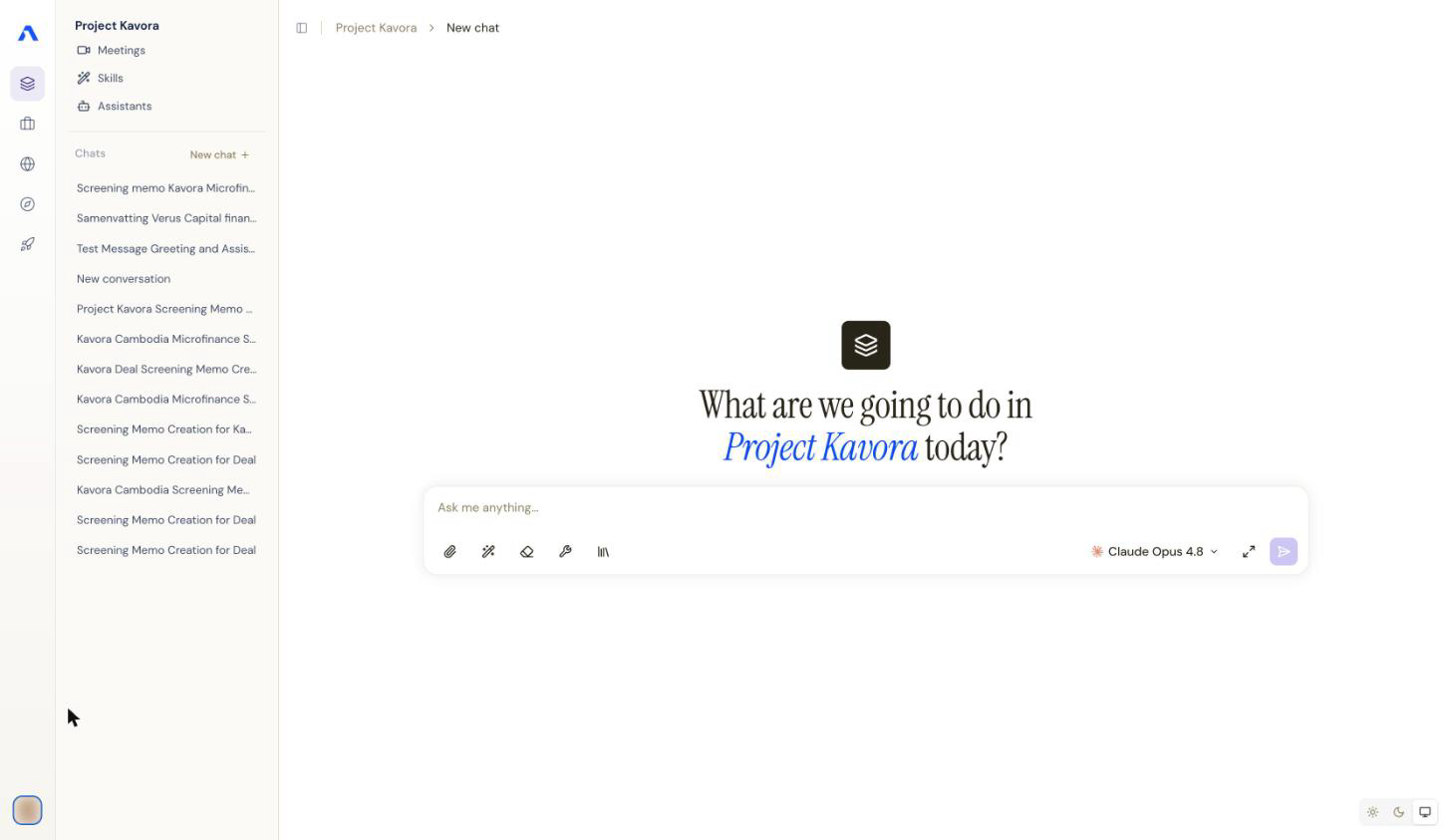
- The space rail (far left) lists the spaces you belong to. Click one to switch — everything else on screen (conversations, skills, collections) changes with it, because each space is isolated from the others.
- The side panel shows what's available in the current space: your conversations, the space's skills, and — in your personal space — your Files Collection.
- The chat canvas (right) is where conversations happen. Type
/in the composer to discover skills, or use the paperclip to attach files.
What you can do here
- Chat with knowledge — ask questions against the space's collections, attach files, and manage your conversation history.
- Run skills — packaged procedures your admin enabled: from generating reports to filling calculation models. Skills can ask you questions while they run.
- Work privately — Aimable detects personal data in what you upload and lets you review and pseudonymise it before it ever reaches a model.
Note: what you see depends on your space. If a feature from these docs is missing, your space admin may not have enabled it — the Console guides describe what admins can switch on.
Where things live
| I want to… | Go to |
|---|---|
| Start a fresh conversation | New chat in the side panel |
| Run or browse skills | Skills in the side panel, or type / in the composer |
| Choose which collections a conversation searches | the collection selector next to the composer |
| Review detected personal data before sending | the privacy preview that appears on upload |
| Find a past conversation | the conversation list in the side panel |